How to Review Google Ads Search Terms
Review search queries before excluding them. Use a worked decision table to check intent, conversion delays, negative match type and campaign scope.

Quick Answer
Separate the Search Term from Your Keyword
Check the Period and Measurement Before Judging a Row
Make Separate Decisions to Keep, Observe or Exclude
What Does Each Negative Match Type Exclude?
Review Where the Negative Will Apply
Check the Outcome After the Change
Quick Answer
Google Ads search terms describe actual queries that triggered an ad. Compare each query with the offer, reliable conversion records and enough data; keep relevant demand, observe uncertainty and choose the negative match and scope for exclusions.
An office-cleaning business receives a click for “cleaning job vacancies”. The same report contains “office cleaning quote”, which has not converted yet. Excluding both is easy, but the decisions should differ. The first person appears to want employment; the second may need the service the business sells.
Separate the Search Term from Your Keyword
A keyword is a targeting expression you add to an ad group. A search term is the query a person actually entered. The report’s match-type column describes the relationship between the query and keyword; it need not repeat the match setting you selected for that keyword.
In Google Ads, open Search terms under Insights and reports in the Campaigns area. Google’s report documentation explains that privacy limits keep some low-volume queries out of the table. It is not a complete transcript of every search. If you have not launched yet, start with the Search campaign setup steps.
Check the Period and Measurement Before Judging a Row
Select a campaign, ad group and date range. Read search term, matched keyword, cost, clicks and conversions together. A recorded conversion might be a submitted form or a phone-button click; it is not automatically a customer. Use the conversion measurement plan if the action’s meaning is unclear.
Someone who clicked yesterday may still be considering a quote. Allow for conversion delay, limited click data and the sales team’s assessment. A fixed click threshold applied to every account can exclude relevant searches before a longer buying process has finished.
Make Separate Decisions to Keep, Observe or Exclude
The example below concerns an imaginary company selling office cleaning to businesses. It contains no client results. A different service offer would change how the same query should be treated.
| Query | Observation | Decision and Reason |
|---|---|---|
| cleaning job vacancies | The person wants employment rather than a cleaning service. | Review a suitable negative and its scope without affecting a recruitment campaign. |
| office cleaning quote | Relevant need; two clicks and no form yet. | Observe. Check the page and tracking; two clicks do not establish failure. |
| office cleaning free survey | The company offers a free site survey. | Keep. Excluding “free” alone could remove relevant searches. |
| home cleaning | The company does not clean homes. | Consider excluding the need from this service campaign; check other services before widening the scope. |
An expensive but relevant query may reveal a problem with the ad promise, landing page or quote process. Before excluding it on cost alone, distinguish CPC from the cost of a qualified enquiry. Record the unmet need rather than leaving “too expensive” as the entire explanation.
What Does Each Negative Match Type Exclude?
A negative keyword does not automatically exclude every related meaning. Broad, phrase and exact negative matching affect different queries in Search campaigns. Google’s negative keyword documentation distinguishes these rules and the need to consider synonyms and singular or plural forms separately.
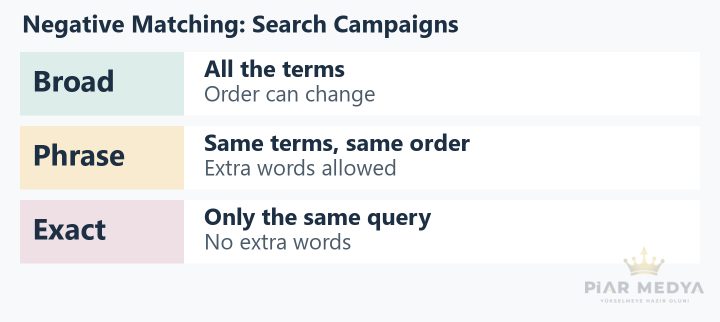
The diagram explains Search campaign rules; it is not a Google Ads screenshot. In text: broad negative matching requires all terms but allows a different order; phrase requires the same order and allows extra words; exact excludes the query without extra words.
| Search Query | Broad Negative | Phrase Negative | Exact Negative |
|---|---|---|---|
| free training | Excludes | Excludes | Excludes |
| free training video | Excludes | Excludes | Not excluded by this rule |
| training free | Excludes | Not excluded by this rule | Not excluded by this rule |
“Not excluded by this rule” does not promise an impression; other settings and auction conditions still apply. Current documentation says casing and misspellings are handled automatically. That does not extend the negative to every synonym or close variant.
Review Where the Negative Will Apply
An ad-group exclusion, campaign exclusion and shared list have different scopes. A product unwanted in one group might be sold in another. Separate needs the business never serves from those unsuitable only for a specific campaign. Read the connected campaigns before applying a shared list.
When adding negatives from the search terms report, the default selection can be negative exact match. Check the expression, match type and destination group or campaign before saving. A generic exclusion list should not be treated as ready for every account.
Check the Outcome After the Change
Keep the date, query, reason, negative expression, match type, scope and person responsible for review. Later, assess whether relevant enquiries were preserved as well as whether spending fell. Choose the review period around data volume and conversion delay, and account for seasonal or budget changes.
If free-survey enquiries disappear after “free” is excluded, revisit the rule’s scope. The objective is suitable demand, not a shorter report. When working with an agency, include query-review ownership and the decision log in the Google Ads management scope.
FREQUENTLY ASKED QUESTIONS (FAQs)
No. A keyword is targeting you add to an ad group; a search term is the query someone entered. Review the matched keyword and actual query separately.
No. Phrase negative matching requires the terms in the same order, although the query can contain additional words. Broad negative matching can exclude a query containing all the terms in a different order.
Review every proposed exclusion against your offer and the campaigns affected. A list built for a company that never provides free consultations could remove useful demand for one that does.
Select the relevant query and use the negative-keyword action. Before saving, check the expression, match type and ad-group, campaign or list scope. A default selection is not an editorial decision.
It can suggest candidates, but it does not know every service you sell, your sales cycle or whether conversion tracking is correct. Review the actual query and record why the exclusion is appropriate.
They answer different questions. Planner supports research and forecasts; the report describes observed queries for running ads. Use the account data to examine what happened rather than treating a forecast as a recorded result.