Why is a Mobile-Friendly Website Mandatory? A Comprehensive Responsive Design Analysis
Explore what responsive web design is and how it adapts to over 70% of mobile traffic. Boost your Google rankings and conversion rates with our 2026 guide. You will find answers to all your questions related to topic Why is a Mobile-Friendly Website Mandatory? A Comprehensive Responsive Design Analysis in the continuation of the text.
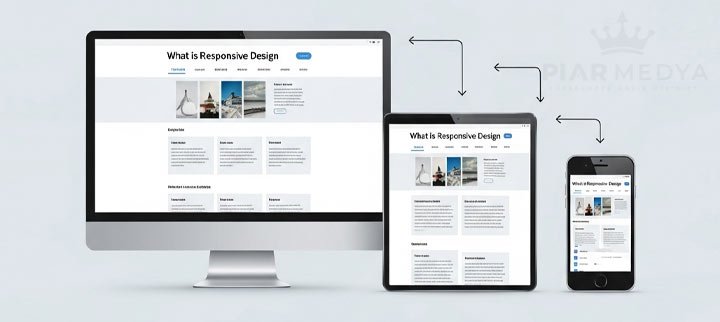
Responsive Design: A Comprehensive Guide to Mobile-Friendly Websites
What Exactly is Responsive Web Design (RWD)?
Responsive Design vs. Mobile Site: Why Are They Worlds Apart?
Why Responsive Design is a Necessity, Not a Luxury, for Your Business
1. Google's Mobile-First Indexing
2. Superior User Experience (UX)
3. Increased Conversion Rates
4. Protecting Your Advertising Budget
5. Being Future-Proof
Your Digital Presence Begins on Mobile Devices
What Are Core Web Vitals and What Counts as a Good Score?
Responsive web design (RWD) is a development approach that lets a single website automatically adapt its layout to any screen size, from desktop monitors to smartphones. It relies on three core techniques: fluid grids, flexible images and CSS media queries. With more than 70% of global internet traffic coming from mobile devices and Google ranking sites by their mobile version first, a responsive layout is the baseline for visibility, usability and conversions in 2026.
The smartphone in your pocket is no longer just a communication tool; it is your primary window for exploring the world, shopping, and searching for information. In our agency audits across diverse industries, responsive usability directly governs visitor retention. According to data from Statista, in 2026, more than 70% of global internet traffic comes from mobile devices. How does your website look when viewed through the window of this massive audience? Can users read your content comfortably, or are they constantly forced to zoom in and out to see the text? The answer determines your success across modern search results.
Responsive Design: A Comprehensive Guide to Mobile-Friendly Websites
We examine the mechanics of Responsive Web Design (RWD), the gold standard of the modern web. Below is a breakdown of what responsive design is, how it functions under the hood, and why in 2026 it serves as an absolute technical necessity.
What Exactly is Responsive Web Design (RWD)?
Responsive Web Design is a technique that allows a website to intelligently adapt and reconfigure itself according to the screen size (desktop computer, tablet, smartphone) and orientation of the viewing device. In practice, a single website offers a seamless user experience across all devices.
Consider the behavior of a liquid: Water takes the shape of the glass, pitcher, or bottle it is poured into. A responsive website reshapes its layout to remain readable and usable regardless of screen dimensions.
Three core technical principles drive responsive behavior:
- Fluid Grids: Defining element widths with proportional units like percentages (%) rather than rigid pixel (px) values.
- Flexible Images: Ensuring that images scale up or down proportionally within their containing elements.
- Media Queries: Applying specific CSS styling based on screen dimensions, such as switching from a multi-column desktop navbar to a collapsed mobile navigation drawer under 768 pixels. The documentation on MDN Web Docs outlines these technical specifications in detail.
Responsive Design vs. Mobile Site: Why Are They Worlds Apart?
A common legacy setup was maintaining separate mobile sites on subdomains such as "m.domain.com", serving scaled-down versions of desktop templates. The approach is obsolete for several reasons:
- Management Difficulty: Maintaining two codebases doubles deployment overhead and development costs.
- SEO Risks: Splitting identical content across separate URLs creates duplicate content risks and dilutes authority in SEO rankings.
- Poor User Experience: Stripped-down mobile subdomains frequently omit key desktop features, frustrating mobile visitors.
A responsive layout resolves these challenges through a unified URL and a single content codebase.
Why Responsive Design is a Necessity, Not a Luxury, for Your Business
Maintaining a mobile-friendly architecture is the foundational pillar of your digital presence.
1. Google's Mobile-First Indexing
When crawling and ranking websites, Google primarily evaluates their mobile versions. If the mobile layout is slow, difficult to navigate, or serves incomplete content, desktop rankings will suffer accordingly. Google judges your site's overall quality through its mobile implementation.
2. Superior User Experience (UX)
A mobile-friendly site ensures that visitors can find information, interact with tap targets comfortably, and browse without navigation friction. Intuitive usability lowers bounce rates and extends session duration, providing clear engagement signals to search engines.
3. Increased Conversion Rates
When visitors can easily review products, submit inquiries, or request quotes directly on mobile devices, conversion rates climb significantly. For e-commerce sites, mobile conversion rates depend heavily on responsive layout efficiency.
4. Protecting Your Advertising Budget
Directing paid traffic from Google Ads campaigns to an unresponsive landing page causes immediate drop-offs and wasted spend. Responsive landing pages directly safeguard the return on investment (ROI) of your marketing budget.
5. Being Future-Proof
Fluid grid architecture supports not just standard phones, but foldable screens, high-resolution tablets, and unconventional displays, keeping your technical infrastructure prepared for emerging hardware.
Your Digital Presence Begins on Mobile Devices
An unresponsive website effectively turns away over 70% of potential visitors. Establishing a responsive layout is the critical baseline for delivering quality user experiences, securing competitive Google positions, and maximizing return on digital marketing investments.
At Piar Medya, our web design processes operate on a mobile-first philosophy. We architect layouts beginning from smaller screens, ensuring your brand message renders cleanly across every resolution. Explore how your business can expand with a professional and fully responsive website.
Responsive layouts work hand-in-hand with functional client-side logic; read our analysis on JavaScript usage and performance.
Mobile conversion patterns also shift across industries; examine specific solutions in our breakdown of industry-specific website strategies.
What Are Core Web Vitals and What Counts as a Good Score?
Google evaluates user experience through three Core Web Vitals metrics measured primarily on mobile viewports. Each metric directly reflects responsive optimization quality:
| Metric | What it measures | Good score |
|---|---|---|
| LCP (Largest Contentful Paint) | Render time of the largest visible content block (hero image or primary heading) | 2.5 seconds or less |
| INP (Interaction to Next Paint) | Latency observed when users interact with page elements (taps, clicks, key presses) | 200 milliseconds or less |
| CLS (Cumulative Layout Shift) | Unexpected layout movement occurring during page load | 0.1 or less |
Low scores frequently stem from responsive design pitfalls: uncompressed desktop assets served to mobile viewports, render-blocking scripts, and unsized image elements causing layout shifts. Implementing fluid media, explicitly declaring image dimensions, and optimizing critical CSS paths resolve these performance bottlenecks.